All work

Studio Leaf

Plant e-commerceWeb2026

A plant shop for people
afraid of killing plants

Plant retailers organise their catalogues the way a botanist would — by species, in Latin. The customer is standing in their flat thinking about a north-facing window, a radiator and a cat. I rebuilt the shop around the conditions people actually have, and closed the three points where a plant purchase falls apart.

Role
Product designer, end to end
Focus
Product discovery and checkout
Delivered
IA, flows, UI and design system — desktop and mobile
Method
Competitive review, heuristic evaluation, scenario mapping
Tools
Figma, variables, components
StudioLeaf home page: a full-bleed plant photograph with search and category navigation over it.

Nobody walks away from a plant because it costs forty euros. They walk away because they are not sure it will still be alive in March.

24Screens designed

Eighteen at desktop width and six at 390, including the states most portfolios skip — empty bag, no results, 404.

5Filters, not forty

Each one a condition a customer can answer about their own home without looking anything up.

52Design tokens

Colour, spacing, radius and border. Every value in the product resolves through one of them.

AAContrast, measured

Every text and surface pairing computed against WCAG 2.1, transparency composited over what sits behind it.

Make a catalogue
a beginner can use

A competitive review of plant retailers, a heuristic pass over the existing shop, and scenarios written from the customer's side.

Every shop I looked at was built for somebody who already knew the answer. The navigation listed species. The product page led with a Latin name and a photograph. Care information, when it existed at all, sat behind a tab called Details, three clicks away from the decision.

That is a perfectly good structure for a nursery serving collectors. It is the wrong structure for the person who actually buys most houseplants: someone furnishing a room, who has never kept one alive, and who is trying to work out whether this particular plant will survive them.

So the job was not to make the cards prettier. It was to change what the shop asks the customer to know before it can help them.

What the review turned up

  • You have to know the name to find anythingNavigation and filters were organised by species and genus. Nothing let you search by the room you were buying for.
  • The real objection is answered lastLight, watering and difficulty — the three things that decide whether someone buys — were the lowest content on the page, or missing.
  • Delivery cost appears after the formShipping was revealed at the end of checkout, once an address had already been typed in.
  • The cart is a one-way doorOnce in the bag, the only prominent action was to pay. Adding a second plant meant using the back button.

Search by conditions,
not by species

Five filters, each one a constraint a customer can answer about their own home without looking anything up.

You can try it: this filter really worksOpen a filter below and tick an option. Bright light together with Pet friendly leaves no result, and that is the moment worth looking at.

Nine products with their real attributes. Try Bright light together with Pet friendly — nothing matches, and how a shop behaves at that moment matters more than how it looks when everything does.

LightBright · Indirect · Low

The one condition that actually kills plants. It is the first filter and the first fact on the product page.

SizeS · M · L · XL

Answers "will it fit on the shelf", and drives the price tiers, so it does double duty.

Care levelEasy · Medium · Demanding

Lets a first-time buyer rule out everything that will punish them, in one tap.

Pet friendlyYes · No

A safety question, not a preference. It is binary and it is never buried in a description.

PriceRange

Last, deliberately. Sorting by price first hides the plants that would have worked.

Five steps,
no dead ends

The whole purchase, in order, from the real file. Scroll to walk it.

  1. 01FindConditions, not species. The customer answers questions about their room, not about botany.
  2. 02DecideLight, water and difficulty sit beside the price — the objection answered where it is raised.
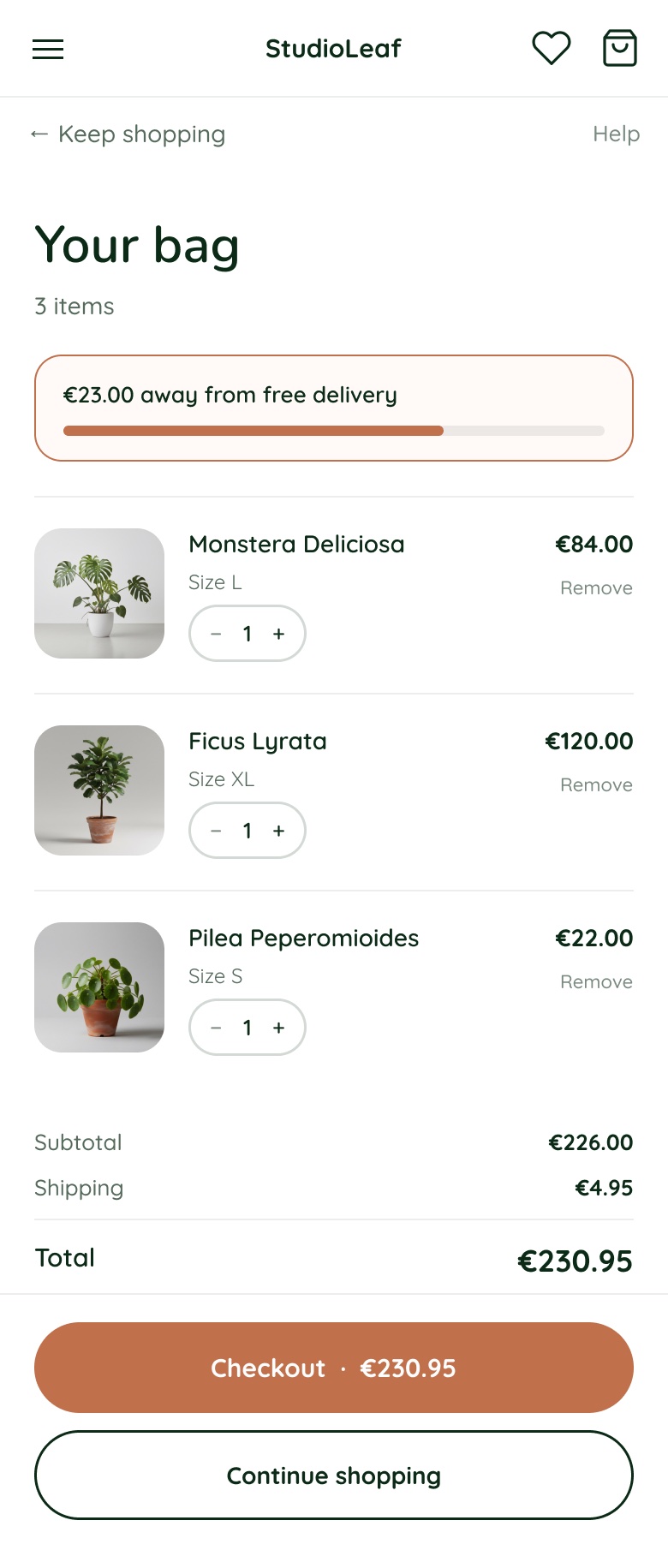
  3. 03BagContinue shopping carries the same visual weight as checkout. Plants are bought in twos and threes.
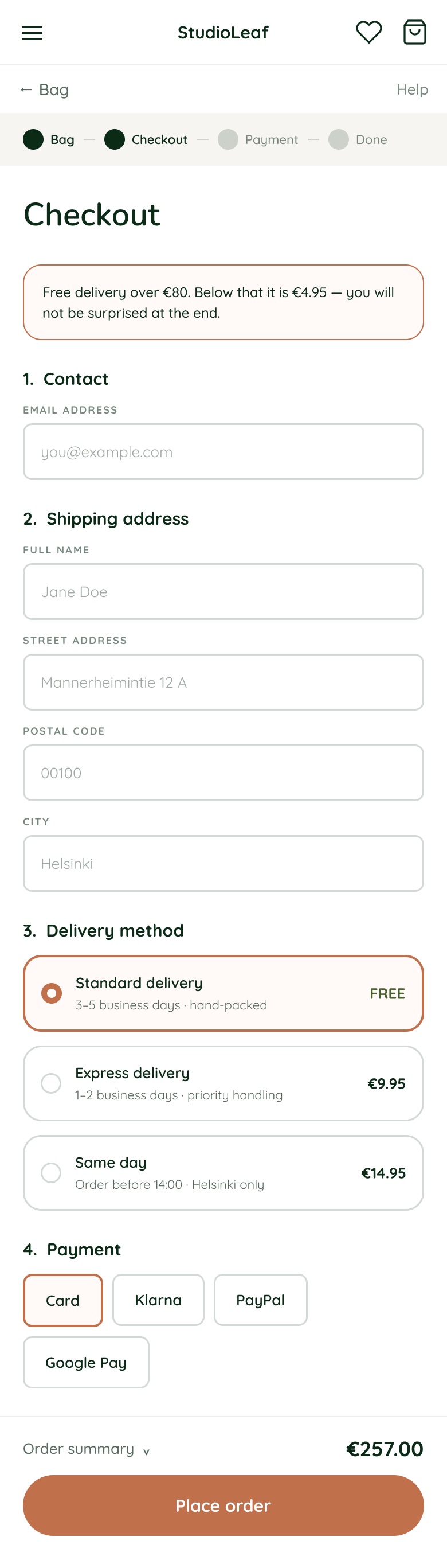
  4. 04PayDelivery cost is stated before the first form field. Klarna, card, PayPal, Google Pay.
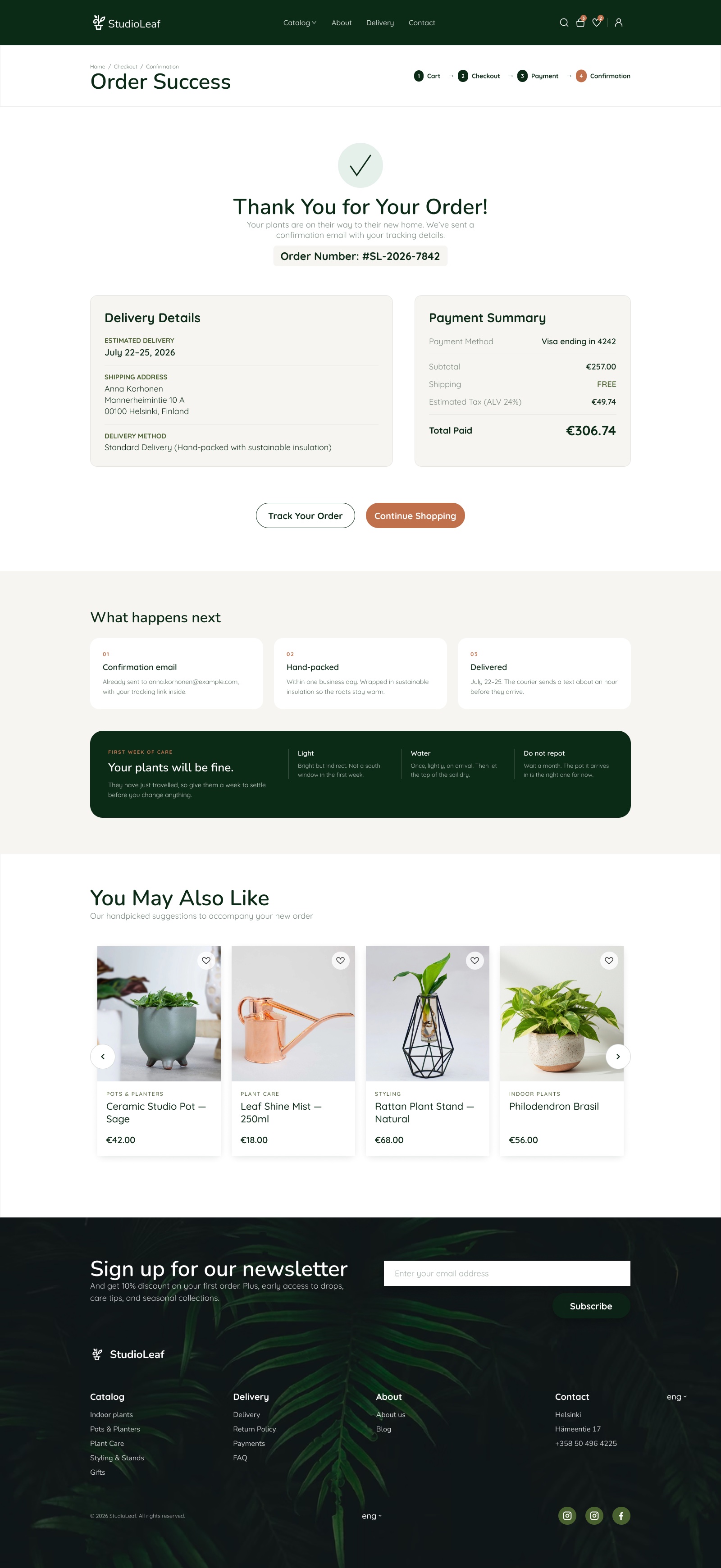
  5. 05ReassureThe confirmation carries care instructions, because that is the next thing a buyer worries about.
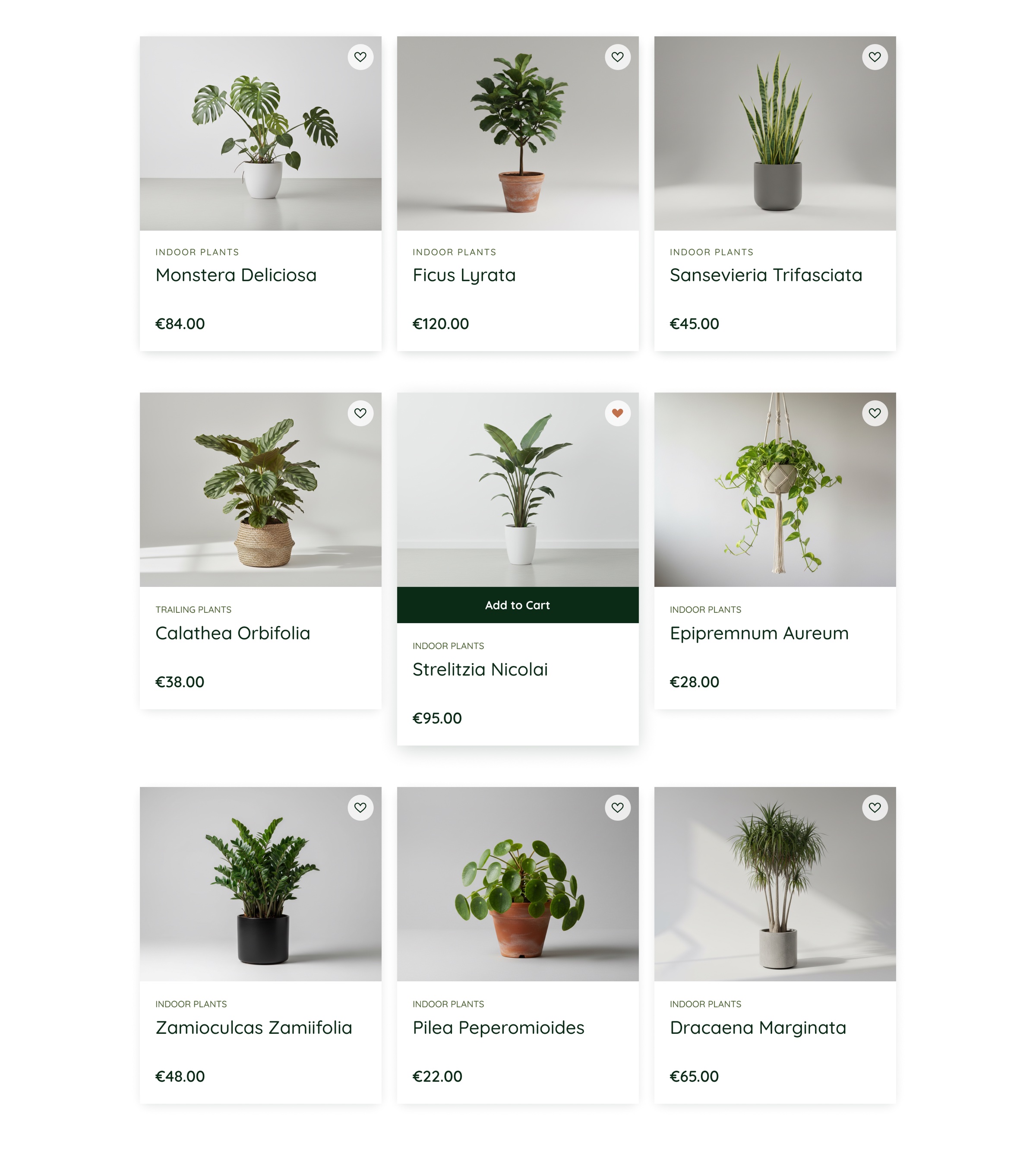
studioleaf.com/indoor-plants
Catalogue grid with filters applied
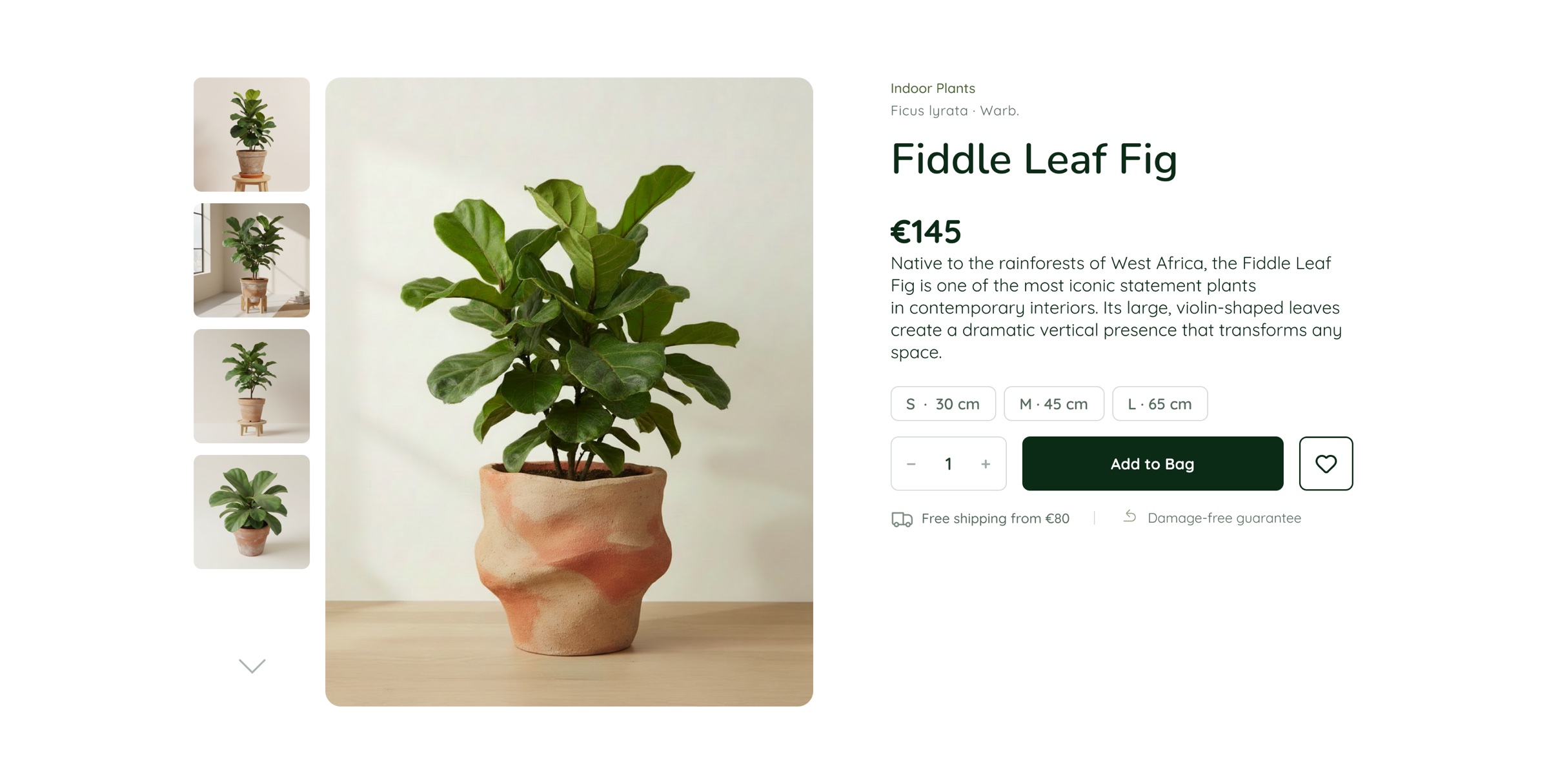
studioleaf.com/fiddle-leaf-fig
Product page with gallery, size selector and care facts
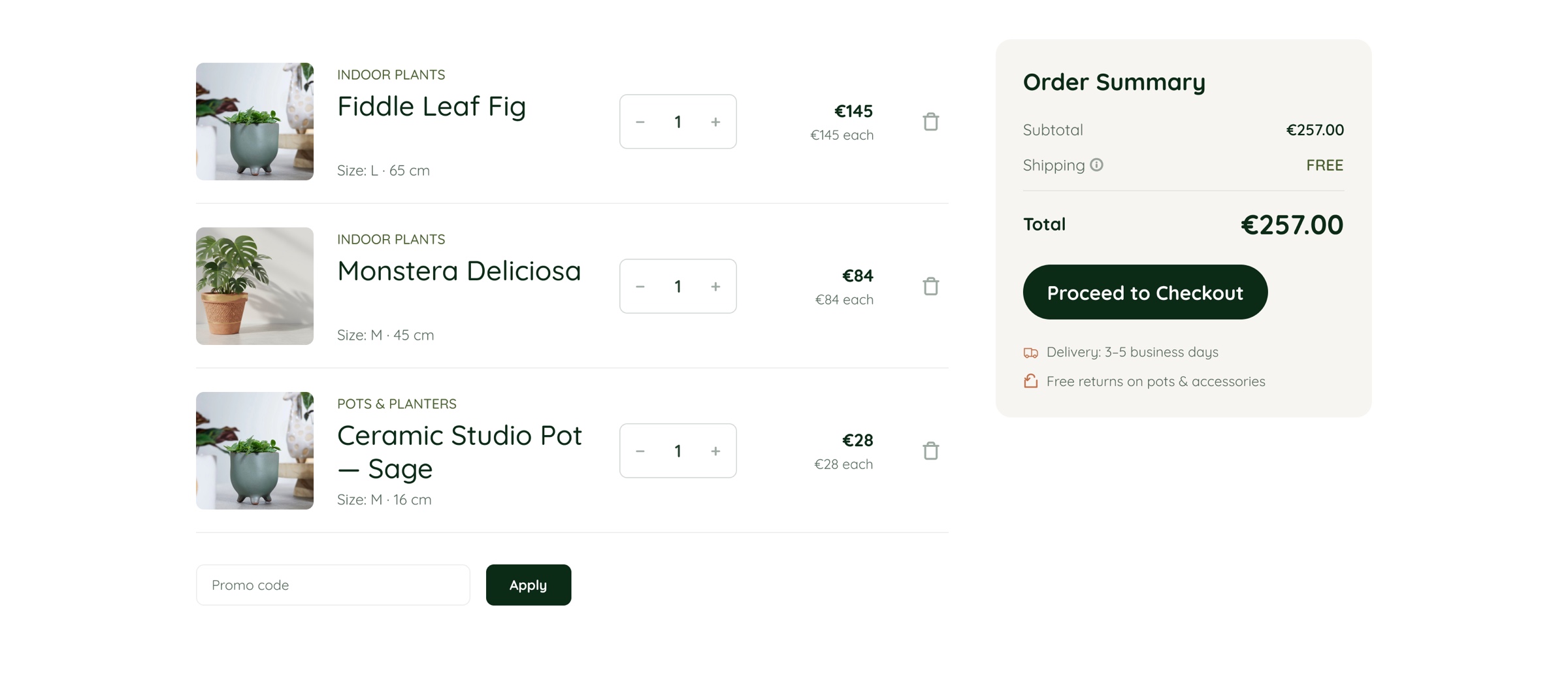
studioleaf.com/cart
Shopping bag with line items and the order summary
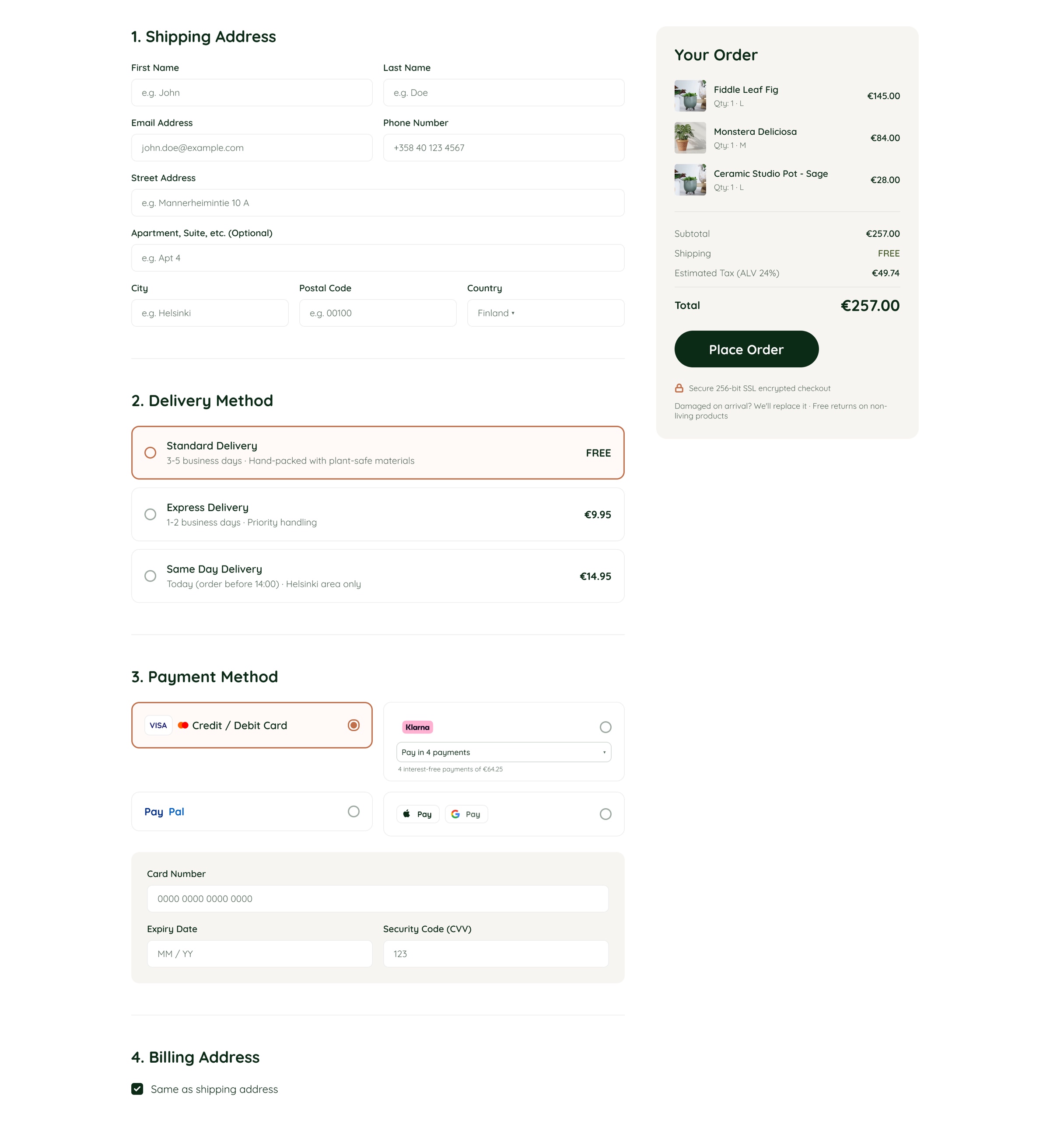
studioleaf.com/checkout
Checkout: address, delivery method and payment
studioleaf.com/order/4821
Order confirmation: thank you, delivery details, what happens next and first week of care

Three fixes,
and what each cost

Each of these made some other part of the screen worse. Choosing which part is the design decision.

01

Care facts sit beside the price

Light, watering interval and difficulty are three equal facts directly under the price — not inside a Details tab. The doubt that stops the purchase gets answered at the moment it is felt, without a click that most people never make.

What it cost — the hero grew taller and the gallery lost a thumbnail row. The first draft looked better with the facts tucked away, and was worse.
02

Delivery cost before the first field

Checkout opens with free over €80, otherwise €4.95, stated above the address form. Revealing shipping after someone has typed their details is a dark pattern whether or not it is meant as one, and it is the classic abandonment point.

What it cost — the summary panel carries more text than a clean layout wants, and the step-one header is busier than the other three.

03

The bag is not a one-way door

People buy plants in twos and threes — one for the shelf, one for the pot they already own. Continue shopping gets the same weight as Checkout, and the cart keeps recommending pots and care products rather than rushing to payment.

What it cost — two competing calls to action on one screen, which only works because checkout is the only filled button and continue is outlined. That rule is now in the system.

Not a shrunken
desktop

Three breakpoints share one twelve-column grid. What changes between them is not the scale — it is which pattern a component uses.

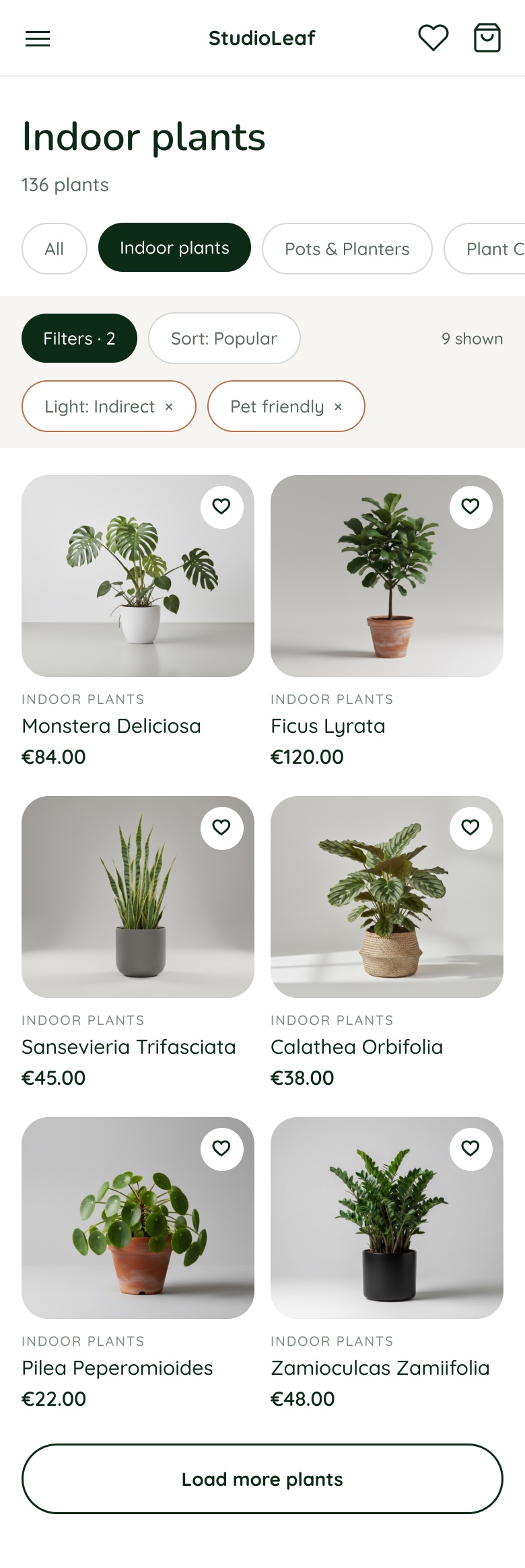
Mobile catalogue: two-up product grid with a collapsed filter bar and removable filter chips.
01 — CatalogueFive filter dropdowns collapse into one button. The grid goes two-up, and the active conditions stay on screen as removable chips.
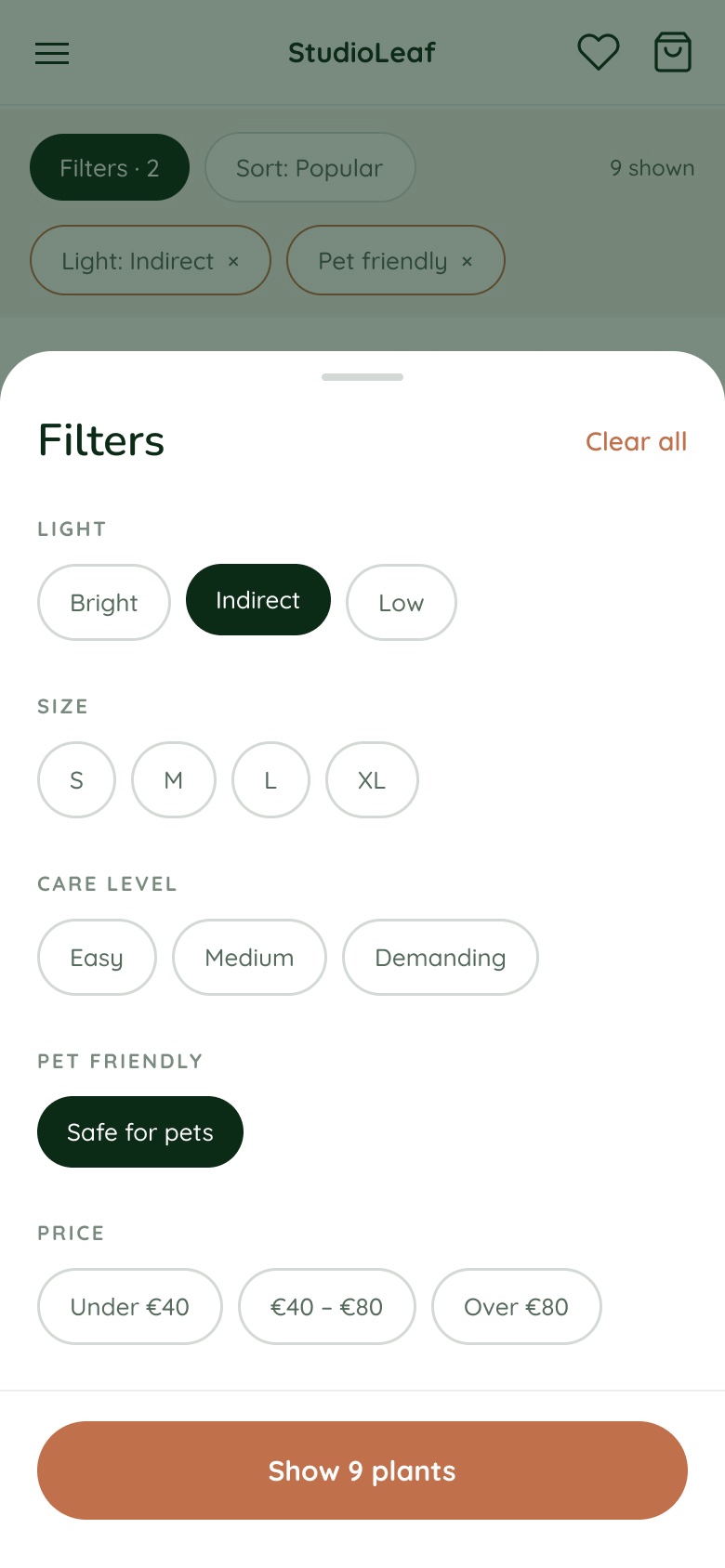
Mobile filter bottom sheet over a dimmed catalogue, with the result count on the confirm button.
02 — FiltersFilters become a bottom sheet. The result count sits on the button, so the customer sees what a choice costs before closing it.
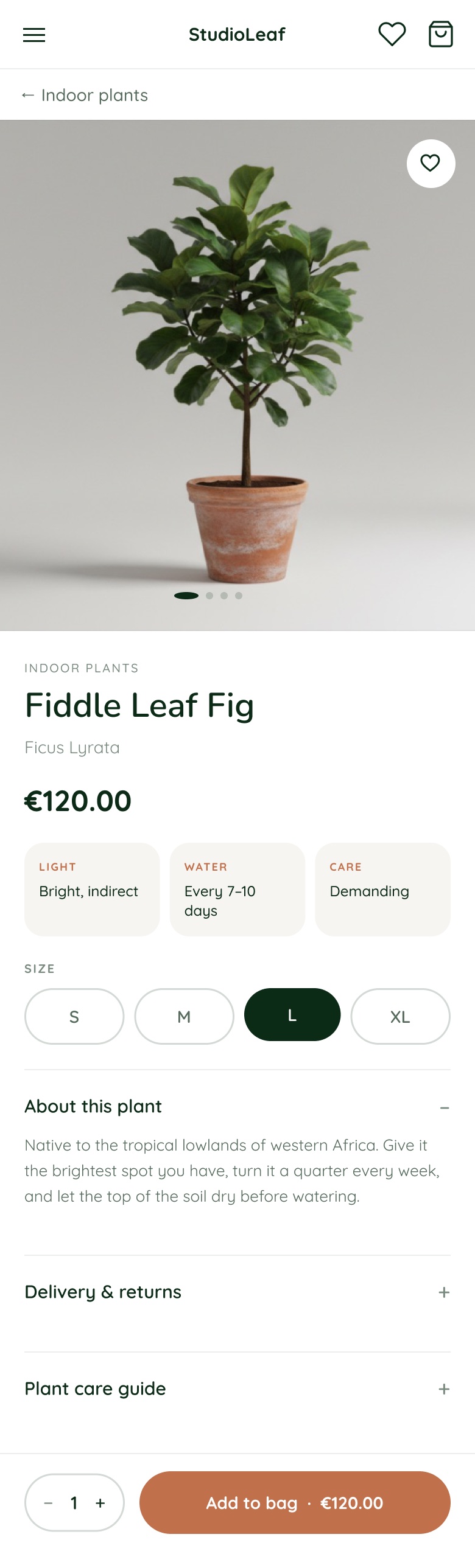
Mobile product page with care facts under the price and a pinned add to bag bar.
03 — ProductCare facts stay directly under the price. Add to bag is pinned to the bottom of the viewport rather than waiting at the end of the page.
Mobile shopping bag with line items, a free delivery progress bar and two stacked actions.
04 — BagContinue shopping sits under checkout with equal weight, and the gap to free delivery is named as a number rather than hinted at.
Mobile checkout with the delivery cost stated above the first form field.
05 — CheckoutDelivery cost still comes before the first field. The step indicator compresses to a strip and the order summary folds into the sticky bar.
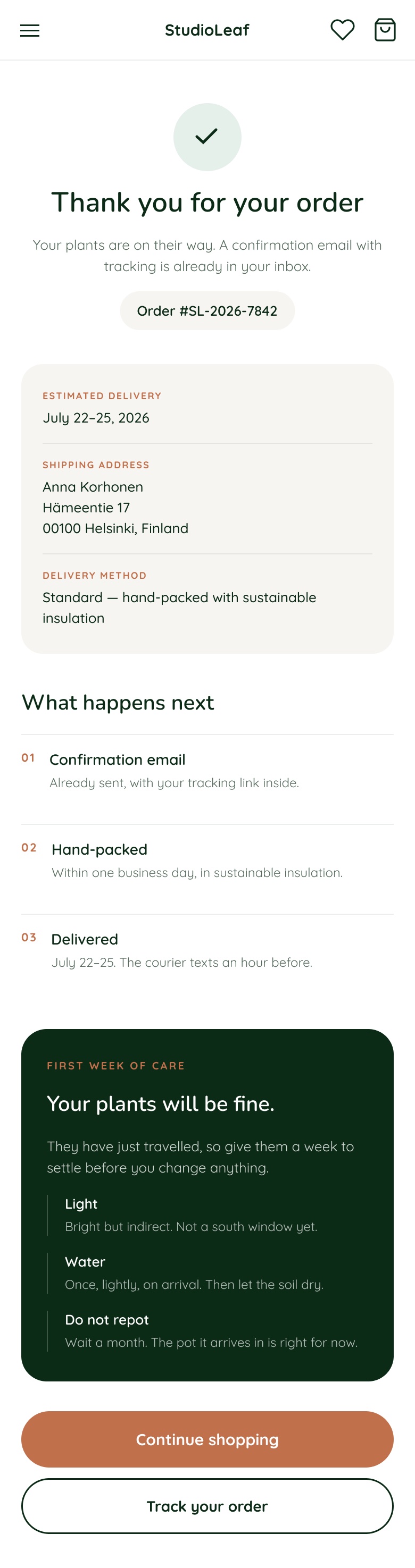
Mobile order confirmation with what happens next and first week of care.
06 — ConfirmationWhat happens next, then how to keep the plant alive for a week. The route back into the catalogue is the primary button, not a link.
Desktop1600 and up · 12 columns · 200 margin

Product grid runs four up, filters sit in a persistent bar, the hero is full-bleed.

Tablet768 – 1599 · 8 columns · 48 margin

Grid drops to two up. Filters stay in a bar until there is no longer room for the result count beside them.

Mobile360 – 767 · 4 columns · 20 margin

Filters move into a sheet and the primary action is pinned. Content order never changes — only its container does.

Built so a second
designer could
pick it up

Eighteen screens only stay consistent if the values behind them are named. Every colour, space and radius resolves through a variable.

52Design tokens across colour, spacing, radius and border — one source of truth for every value.
24Components, each documented in every state: hover, pressed, focus, disabled, selected.
14Documentation sections, including accessibility, motion, patterns and a full token table.
AAEvery text pairing measured against WCAG 2.1, with transparency composited over the surface behind it.

Colour

Three brand colours, one of them for action

Secondary text and borders are not separate greys: they are the brand green at a set opacity, which is why the interface stays warm instead of drifting grey.

brand/terracotta#c0704a

The one accent. It marks what the customer can do: buy, add, save.

brand/dark-green#0b2b16

Text, ink surfaces and the dark button.

brand/olive#49602f

Success states and small marks.

Surfaces

Four surfaces, two for photographs

Eleven near-white backgrounds had accumulated and none were distinguishable. Four surfaces now cover every case; two more sit behind product photography.

surface/page#ffffff
surface/sand#f7f5f1
surface/blush#fff9f7
surface/ink#0b2b16
surface/image-cool#e5ebe6
surface/image-warm#ded8d0

Ink ramp

Six opacities do the whole job

Contrast ratios are measured on white, with transparency composited over the surface behind. The step used for small secondary text is the lightest one that clears AA, which is not the one that looks right by eye.

ink/90Secondary text is ink, not grey11.36AAA
ink/70Secondary text is ink, not grey5.38AA
ink/55Secondary text is ink, not grey3.64Large text only
ink/40Secondary text is ink, not grey2.41Fails
ink/18Secondary text is ink, not greyBorders
ink/08Secondary text is ink, not greyFills

Type

Nunito to say it, Quicksand to run the interface

Two families with one job each. Nunito carries display and editorial weight; Quicksand runs labels, prices, navigation and buttons. Nothing is set outside this ramp.

Heading/XLNunito SemiBold · 48

Plants for your light

Label/ProductNameQuicksand Medium · 28

Monstera Deliciosa

Label/PriceQuicksand SemiBold · 20

€84.00

Label/ButtonQuicksand Bold · 20

Explore Plants

Nav/TextQuicksand Medium · 18

Indoor plants Pots & Planters Plant care

Body/RegularNunito Regular · 16

Bright indirect light, water when the top inch of soil is dry.

Label/CategoryQuicksand Medium · 14

Pots & Planters

Caption/BadgeQuicksand Bold · 10

Pet safe

Space

An 8 px base with the half-steps the product needed

The screens held 26 different gap values before the audit. Accidents were snapped, the ones doing real work were kept. Layout tokens sit on top: content margin 200, card gap 32, section gap 80.

4
8
12
16
20
24
28
32
40
48
64
80
96

Grid and layout

One grid, and the margin does the adapting

What changes between breakpoints is the margin and how many columns a card takes. Content never exceeds 1200: on a wide monitor the margin grows instead of the text line. Sections are separated by 80, a header sits 32 above its content, and a sub-group 48 below the one before it.

Desktop1600 and up12 columns · 200 margin · 32 gutter

Product grid runs 4 up. The hero is full-bleed.

Tablet768 – 15998 columns · 48 margin · 24 gutter

Product grid drops to 2 up. Filters collapse into a sheet.

Mobile360 – 7674 columns · 20 margin · 16 gutter

Single column. The sticky Add to bag bar appears here.

Elevation

Three levels, tinted with the brand green

A black shadow on a warm page reads as dirt; an ink shadow reads as depth.

Shadow/Card/Default0 4 16 · ink 10 %
Shadow/Card/Hover0 8 32 · ink 18 %
Shadow/Button0 2 8 · ink 10 %

Components

One primary button, and it is terracotta

Every button in every state, built from the real values in the file. Primary is terracotta and there is only one on a screen; dark is the quiet alternative; chips show a selection two ways, fill and weight, never colour alone.

Explore PlantsPrimary · default
Explore PlantsPrimary · hover
Explore PlantsPrimary · pressed
Explore PlantsPrimary · disabled
Explore PlantsDark · default
Explore PlantsDark · hover
Explore PlantsDark · pressed
Explore PlantsDark · disabled
Add to BagAdd to Bag · default
Add to Baghover
Load more plantsLoad more · default
Indirect lightPet friendlyFilter chip · default, active

Motion

Movement confirms that something happened

Nothing animates for its own sake, and nothing that moves may delay a tap. Under reduced motion every duration collapses to zero and transforms are dropped, but state still changes colour.

Instant0 msnone

Pressed states. A button must look pressed on the same frame as the finger lands.

Quick160 msease-out

Hover, focus ring, chip selection. Short enough that it never gates a second click.

Standard240 mscubic-bezier(.2,.8,.2,1)

Card lift, dropdown open, filter drawer. The default for anything that changes shape.

Considered420 mscubic-bezier(.16,1,.3,1)

Add to bag: the bag count change and the item flying in. The one place a customer should notice.

What it forbids

Mistakes that were really in the file

Each of these was in the file before the audit, not a hypothetical. They are written down so they do not come back.

  • Pick the surface from the rampEleven near-white backgrounds had accumulated and none were distinguishable. Four surfaces now cover every case.
  • Secondary text is ink, not greyTailwind defaults had leaked in (#111827, #9CA3AF, #6B7280) and read cold next to a warm green page. Secondary text is brand green at an opacity.
  • Check the ramp before adding a stepSixteen different opacities of the same green were in use. Six do the whole job. If a design needs a seventeenth, the problem is the design.
  • One accent, reserved for actionTerracotta marks what the customer can do: buy, add, save. The moment it decorates a heading it stops meaning anything.
  • Measure contrast, do not eyeball itink/55 looks perfectly readable and scores 3.64, below AA for body text. 242 small text nodes were moved up to ink/70 after measuring.
  • Style sheet follows the productColor/Accent documented #D49B89 while every screen used #C0704A. A token nobody checks is worse than no token.

The find that mattered

The text I thought was fine was failing.

Botanical names, metadata and field labels were set in the green at 55% — a value that looks perfectly readable and measures 3.64:1. Below AA for body text. Breadcrumbs and placeholders at 40% measure 2.41:1.

I moved 242 small text nodes up to the 70% step, which clears AA at 5.38:1, and rewrote what each step of the ramp is allowed to do. This is the argument for measuring instead of trusting an eye: nothing about those screens looked wrong.

ink/40 on white2.41Fail
ink/55 on white3.64AA Large only
ink/70 on white5.38AA
ink/90 on white11.36AAA
white/80 on ink10.23AAA

Previous project

Arivin — biotech website redesign

The whole science kept word for word, given a sequence a visitor can follow

Next project

AONG — personal finance app In progress

An app that shows what is actually safe to spend

Reach out

Helsinki, Finland

Authorized to work in Finland

Open to product roles